
Aspect Ratio Calculator: How to Calculate Screen and Image Ratios
When working with images, videos, or screen layouts, one small number often determines everything about the final result: the aspect ratio.
Aspect ratio defines the proportional relationship between width and height. It affects how content appears on screens, how videos are displayed on streaming platforms, and how images scale across devices.
An aspect ratio calculator helps convert dimensions, resize images correctly, and maintain proportions when changing resolution.
This guide explains:
- What aspect ratio means
- How to calculate it
- Common aspect ratios used today
- How an aspect ratio calculator works
- Practical examples for video, photography, and design
What Is Aspect Ratio?
Aspect ratio describes the relationship between width and height of an image or screen.
It is usually written in the format:
width : height
Examples:
| Resolution | Aspect ratio |
|---|---|
| 1920 × 1080 | 16:9 |
| 1280 × 720 | 16:9 |
| 1024 × 768 | 4:3 |
| 1080 × 1080 | 1:1 |
Even though the pixel numbers are different, the proportion stays the same.
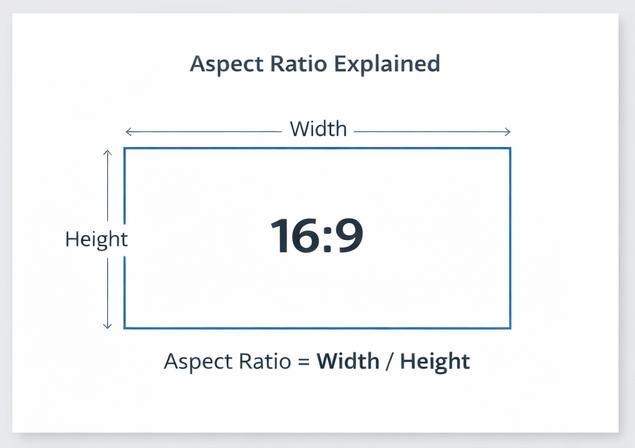
The Aspect Ratio Formula
The ratio can be expressed mathematically as the relationship between width and height.
\text{Aspect Ratio} = \frac{\text{Width}}{\text{Height}}
For example:
- Width = 1920
- Height = 1080
1920 / 1080 ≈ 1.78
This corresponds to the well-known 16:9 ratio used in modern video.
What Is an Aspect Ratio Calculator?
An aspect ratio calculator is a tool that calculates the proportional relationship between the width and height of an image, video, or screen. It helps you resize media while keeping the correct proportions so the image does not become stretched or distorted.
Designers, video editors, and developers use aspect ratio calculators to quickly determine the correct dimensions when scaling images or converting resolutions.
How to Use the Aspect Ratio Calculator
Using an aspect ratio calculator is straightforward. The tool typically requires three values and calculates the fourth automatically.
Step-by-step process
- Enter the original width of the image or video.
- Enter the original height.
- Enter the new width or new height depending on how you want to resize the content.
- The calculator automatically computes the missing dimension while preserving the original ratio.
Example:
Original resolution:
1920 × 1080
If you change the width to 1280, the correct height becomes:
1280 × 720
The aspect ratio stays 16:9, which prevents distortion.
Aspect Ratio Cheat Sheet
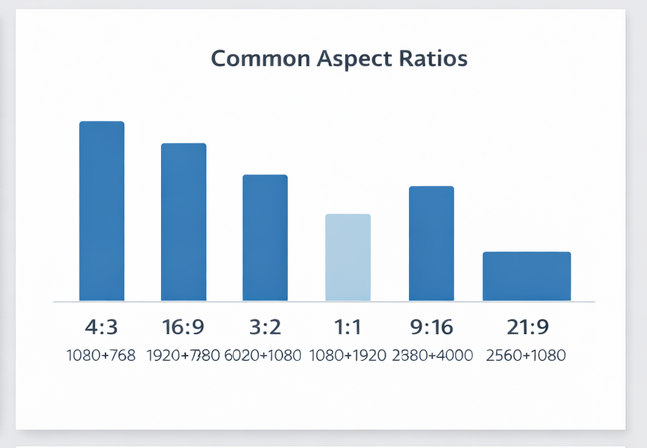
This quick reference table shows some of the most common ratios used in video, photography, and digital media.
| Aspect Ratio | Example Resolution | Typical Usage |
|---|---|---|
| 16:9 | 1920×1080 | HD video, YouTube |
| 4:3 | 1024×768 | older monitors |
| 1:1 | 1080×1080 | Instagram posts |
| 3:2 | 6000×4000 | DSLR photography |
| 9:16 | 1080×1920 | TikTok / vertical video |
| 21:9 | 2560×1080 | ultrawide monitors |
This table is useful when choosing the correct format before resizing images or exporting video.
What Does an Aspect Ratio Calculator Do?
An aspect ratio calculator helps solve several common problems.
1. Maintain proportions when resizing
If you change one dimension, the calculator determines the other dimension automatically.
Example:
Original image
1920 × 1080
If you change width to 1280, the correct height becomes 720.
2. Convert between resolutions
Example:
| Resolution | Ratio |
|---|---|
| 3840 × 2160 | 16:9 |
| 2560 × 1440 | 16:9 |
| 1920 × 1080 | 16:9 |
These are all different sizes of the same aspect ratio.
3. Calculate ratios from dimensions
If you enter width and height, the calculator can simplify the ratio.
Example:
1280 × 720 → 16:9
Aspect Ratio Calculator Examples
These examples show how width and height translate into ratios.
| Width | Height | Aspect Ratio |
|---|---|---|
| 1920 | 1080 | 16:9 |
| 1280 | 720 | 16:9 |
| 1024 | 768 | 4:3 |
| 1080 | 1080 | 1:1 |
| 2560 | 1440 | 16:9 |
Such tables are useful when verifying whether a resolution matches the expected format.
How to Calculate Aspect Ratio Manually
You can calculate the ratio yourself using a simple process.
Step 1: Write the width and height
Example:
1280 : 720
Step 2: Find the greatest common divisor (GCD)
The GCD of 1280 and 720 is 80.
Step 3: Divide both numbers
1280 / 80 = 16
720 / 80 = 9
Final ratio:
16:9
Common Aspect Ratios
Different industries rely on different ratios.
Video and screens
| Ratio | Example resolution | Usage |
|---|---|---|
| 16:9 | 1920×1080 | HD video |
| 16:10 | 1920×1200 | laptops |
| 4:3 | 1024×768 | older displays |
| 21:9 | 2560×1080 | ultrawide monitors |
Social media
| Ratio | Example | Platform usage |
|---|---|---|
| 1:1 | 1080×1080 | Instagram posts |
| 4:5 | 1080×1350 | Instagram portrait |
| 9:16 | 1080×1920 | TikTok / Reels |
Photography
| Ratio | Camera type |
|---|---|
| 3:2 | DSLR cameras |
| 4:3 | Micro Four Thirds |
| 1:1 | square photography |
Example: Resizing an Image with an Aspect Ratio Calculator
Imagine you have an image:
4000 × 3000
This ratio simplifies to:
4 : 3
If you want to resize the image to 1200 pixels wide, you must keep the same ratio.
Height calculation:
1200 × 3 / 4 = 900
Final size:
1200 × 900
Example: Converting Video Resolution
Suppose you have a video resolution:
3840 × 2160
This corresponds to 4K video.
Ratio:
3840 / 2160 ≈ 1.78
Simplified ratio:
16:9
If you want a smaller version of the same video:
1280 × 720
The ratio remains identical.
Why Aspect Ratio Matters
Aspect ratio affects how content is displayed.
If the ratio changes incorrectly, several problems appear.
1. Distorted images
Objects appear stretched horizontally or vertically.
2. Black bars in video
When the video ratio does not match the screen, black bars appear:
- Letterboxing (top and bottom bars)
- Pillarboxing (side bars)
3. Cropping
Some platforms crop images to match required ratios.
Aspect Ratio vs Resolution
These terms are often confused.
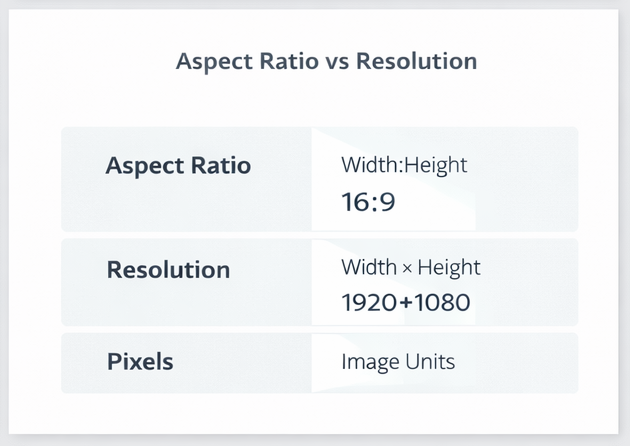
Aspect ratio
Defines proportion.
Example:
16:9
Resolution
Defines pixel dimensions.
Example:
1920 × 1080
Different resolutions can share the same aspect ratio.
Ultrawide Aspect Ratios
Modern monitors increasingly use ultrawide formats.
Examples include:
| Ratio | Example |
|---|---|
| 21:9 | 2560×1080 |
| 32:9 | 5120×1440 |
These ratios provide wider viewing space and are popular in:
- gaming
- video editing
- multitasking
Aspect Ratio in Video Production
Video creators must select the correct aspect ratio before filming or editing.
Common formats include:
| Format | Ratio |
|---|---|
| Cinema | 2.39:1 |
| HD video | 16:9 |
| Vertical video | 9:16 |
| Social video | 1:1 |
Each platform may require different formats.
Example:
- YouTube → 16:9
- TikTok → 9:16
- Instagram posts → 1:1
Aspect Ratio Calculator Example
Let’s say you have a video:
1920 × 1080
You want to scale it down to width 800 while keeping the same ratio.
Height calculation:
800 × 1080 / 1920 = 450
Final resolution:
800 × 450
Aspect Ratio for Social Media Platforms
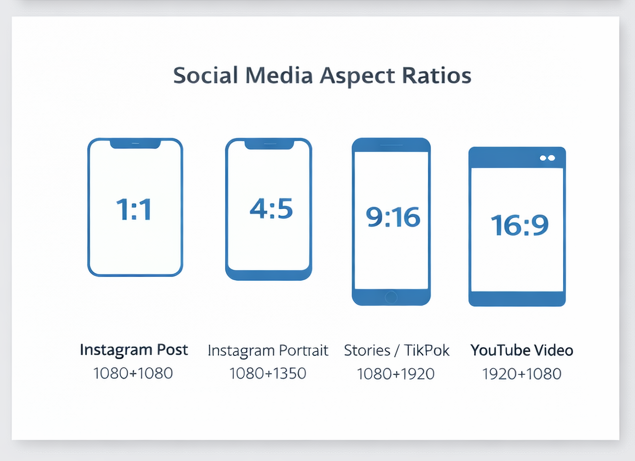
Social platforms often require specific ratios to display content properly. Uploading images with the wrong ratio can lead to cropping or black bars.
| Platform | Recommended Ratio | Example Resolution |
|---|---|---|
| Instagram Post | 1:1 | 1080×1080 |
| Instagram Portrait | 4:5 | 1080×1350 |
| Instagram Stories | 9:16 | 1080×1920 |
| TikTok | 9:16 | 1080×1920 |
| YouTube Video | 16:9 | 1920×1080 |
| Facebook Cover | ~16:9 | 820×462 |
Understanding these formats helps creators design content that displays correctly across devices.
Aspect Ratio vs Resolution vs Pixels
People often use these terms interchangeably, but they refer to different concepts.
Aspect Ratio
The proportional relationship between width and height.
Example:
16:9
Resolution
The total number of pixels in an image or video.
Example:
1920 × 1080
Pixels
Individual units that make up a digital image.
A key point to remember is that many resolutions can share the same aspect ratio.
For example:
| Resolution | Ratio |
|---|---|
| 1920×1080 | 16:9 |
| 1280×720 | 16:9 |
| 3840×2160 | 16:9 |
Common Aspect Ratio Conversions
Sometimes you may need to convert between ratios while keeping the same content.
Example:
Original video:
1920 × 1080 (16:9)
If converted to square format (1:1) for social media:
1080 × 1080
If converted to vertical format (9:16):
1080 × 1920
Each change may require cropping or repositioning elements within the frame.
FAQ: Aspect Ratio Calculator
What is the aspect ratio of 1920×1080?
1920×1080 simplifies to 16:9, the standard format for modern video.
What aspect ratio is 1280×720?
1280×720 also equals 16:9, commonly used for HD video.
What aspect ratio is 4K?
Most 4K displays use the 16:9 aspect ratio, such as:
3840 × 2160
What is a 1:1 aspect ratio?
A 1:1 ratio means width and height are equal.
Example:
1080 × 1080
This format is popular for social media images.
How do you calculate aspect ratio quickly?
Divide width by height and simplify the fraction.
Example:
2560 × 1440
GCD = 160
2560 / 160 = 16
1440 / 160 = 9
Result:
16:9
What aspect ratio is 2560×1440?
2560×1440 corresponds to 16:9, the same ratio used in HD and 4K video.
What aspect ratio is 3440×1440?
3440×1440 uses an ultrawide 21:9 aspect ratio, commonly used for gaming monitors.
What aspect ratio is 1080×1920?
1080×1920 equals 9:16, which is the standard vertical video format used on TikTok, Instagram Reels, and YouTube Shorts.
What is the most common aspect ratio today?
The most widely used ratio is 16:9, which is standard for modern televisions, computer monitors, and online video platforms.
Why is aspect ratio important?
Aspect ratio determines how images and videos scale across devices. Using the wrong ratio can cause stretching, cropping, or black bars in the final display.
Final Thoughts
Aspect ratio plays a crucial role in digital media. Whether you’re resizing images, producing videos, or designing responsive layouts, keeping the correct proportions prevents distortion and display issues.
An aspect ratio calculator simplifies this process by automatically determining the correct dimensions for any resize operation.
Understanding how ratios work makes it easier to adapt content for modern devices, social platforms, and video formats.