
4:3 Aspect Ratio Calculator – Resize Images and Videos Proportionally
A 4:3 aspect ratio calculator helps you resize images, videos, and screen resolutions while keeping the correct proportions. When one dimension changes, the calculator automatically adjusts the other so the image does not become stretched or distorted.
The 4:3 aspect ratio was one of the most widely used screen formats for televisions, computer monitors, and digital cameras for decades. Even today it still appears in photography, presentations, older displays, and certain video formats.
This guide explains:
- What the 4:3 aspect ratio means
- How to calculate it
- How to resize images using a 4:3 ratio
- Common resolutions that use 4:3
- Practical examples
What Is a 4:3 Aspect Ratio?
A 4:3 aspect ratio means that the width of an image is 4 units while the height is 3 units.
The proportional relationship between width and height can be expressed mathematically.
\frac{\text{Width}}{\text{Height}} = \frac{4}{3}
This means that if the width increases or decreases, the height must change in the same proportion.
Example:
| Width | Height | Ratio |
|---|---|---|
| 800 | 600 | 4:3 |
| 1024 | 768 | 4:3 |
| 1600 | 1200 | 4:3 |
All of these resolutions share the same 4:3 proportion.
How the 4:3 Aspect Ratio Calculator Works
A 4:3 calculator maintains the same proportional relationship when resizing media.
The calculator usually requires three inputs:
- Original width
- Original height
- New width or height
The missing value is calculated automatically using the ratio.
For example:
Original resolution:
1024 × 768
If the new width becomes 800, the new height is calculated using the same ratio.
Formula for Resizing a 4:3 Image
To maintain the correct proportions, the new dimension must follow the same ratio.
\text{New Height} = \text{New Width} \times \frac{3}{4}
Example:
New width:
800
Height calculation:
800 × 3 / 4 = 600
Final resolution:
800 × 600
The image remains perfectly proportional.
Common 4:3 Resolutions
The 4:3 format was standard for many years in computer displays and televisions.
Here are some common resolutions using the 4:3 ratio.
| Resolution | Usage |
|---|---|
| 640×480 | early digital video |
| 800×600 | older computer monitors |
| 1024×768 | standard display resolution |
| 1600×1200 | high-resolution monitors |
| 2048×1536 | iPad displays |
Even though the pixel dimensions change, the ratio stays identical.
Why 4:3 Aspect Ratio Still Matters
Although widescreen formats like 16:9 dominate modern video, the 4:3 ratio is still used in several contexts.
Photography
Many cameras and sensors capture images in ratios close to 4:3.
Tablets
Several tablets, including some iPad models, use 4:3 displays because they provide a balanced reading and browsing experience.
Presentations
Slides and documents sometimes use 4:3 layouts for compatibility with older projectors.
Retro video content
Older television footage and archived video material often appear in 4:3 format.
Example: Resizing a 4:3 Image
Suppose you have an image with this resolution:
1600 × 1200
This simplifies to the 4:3 aspect ratio.
If you want the image to be 1000 pixels wide, the height must follow the same proportion.
Height calculation:
1000 × 3 / 4 = 750
Final resolution:
1000 × 750
The image keeps its original proportions without distortion.
Converting 4:3 to Other Aspect Ratios
Sometimes media created in 4:3 must be adapted for modern widescreen displays.
Example:
Original video:
1024 × 768 (4:3)
Converted to 16:9 widescreen:
1280 × 720
However, converting between ratios may require:
- cropping
- adding black bars
- stretching (not recommended)
4:3 vs 16:9 Aspect Ratio
These two ratios are the most commonly compared.
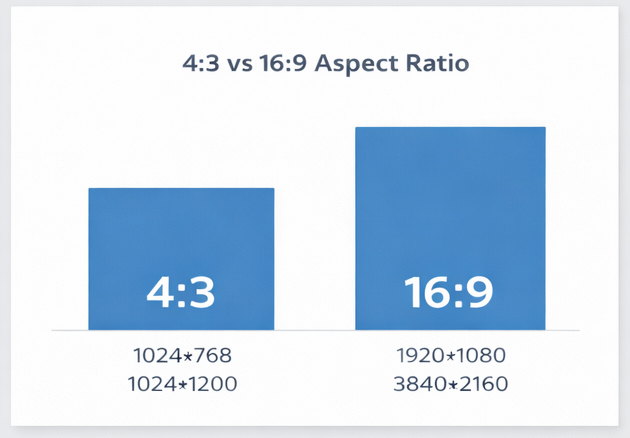
| Ratio | Example Resolution | Typical Use |
|---|---|---|
| 4:3 | 1024×768 | older monitors |
| 16:9 | 1920×1080 | modern video |
| 21:9 | 2560×1080 | ultrawide displays |
The 4:3 ratio is more square, while 16:9 is wider and better suited for cinematic video.
Quick 4:3 Ratio Conversion Table
This table shows how width and height change while maintaining a 4:3 ratio.
| Width | Height |
|---|---|
| 400 | 300 |
| 800 | 600 |
| 1200 | 900 |
| 1600 | 1200 |
| 2000 | 1500 |
These conversions help when resizing images manually.
4:3 Aspect Ratio for Social Media
Although many social platforms prefer square or vertical formats, the 4:3 aspect ratio still works well for several types of posts, especially images and horizontal photos.
The 4:3 format provides a balanced frame that works well on both desktop and mobile screens.
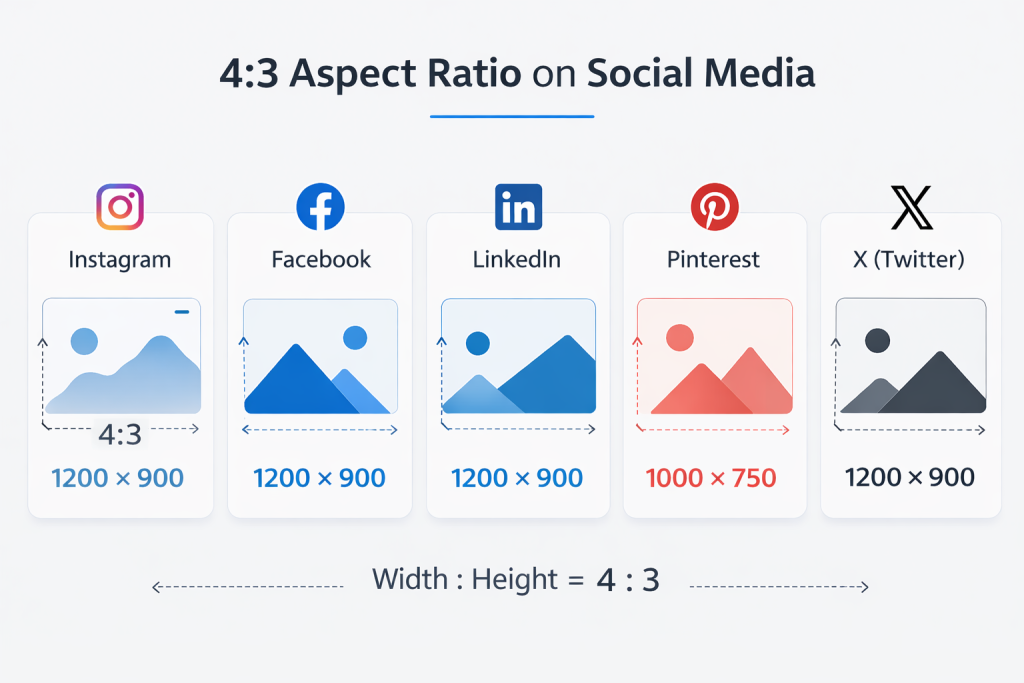
Typical 4:3 resolution example
Example dimensions for a 4:3 image:
1200 × 900
This ratio is commonly used when uploading landscape images to social platforms.
Social Media Platforms That Support 4:3 Images
Many social platforms accept 4:3 images even if their default format is different.
| Platform | 4:3 Example Resolution | Notes |
|---|---|---|
| 1200×900 | Landscape photos | |
| 1200×900 | Link previews and image posts | |
| 1200×900 | Article and post images | |
| 1000×750 | Image pins | |
| X (Twitter) | 1200×900 | Horizontal posts |
These platforms automatically adjust image display depending on screen size, but 4:3 often appears natural and well-balanced.
Why 4:3 Works Well on Social Platforms
The 4:3 aspect ratio sits between square and widescreen formats, which makes it versatile.
Advantages include:
- works well for landscape photos
- fits naturally in news feed layouts
- displays well on mobile screens
- avoids extreme cropping
For photographers and creators posting images online, 4:3 can be a good compromise between visual balance and screen compatibility.
4:3 vs Other Social Media Ratios
Social platforms commonly support several aspect ratios.
| Ratio | Example Resolution | Typical Use |
|---|---|---|
| 1:1 | 1080×1080 | Instagram post |
| 4:5 | 1080×1350 | Instagram portrait |
| 4:3 | 1200×900 | landscape photos |
| 16:9 | 1920×1080 | YouTube video thumbnails |
| 9:16 | 1080×1920 | TikTok / Reels |
While vertical content dominates short-form video platforms, 4:3 remains practical for horizontal images and blog preview graphics.
FAQ:
What resolution is 4:3?
Some common 4:3 resolutions include:
- 800×600
- 1024×768
- 1600×1200
- 2048×1536
Is 4:3 still used today?
Yes. The ratio is still used in tablets, photography, presentations, and retro video formats.
How do you calculate a 4:3 aspect ratio?
Divide width by height and simplify the numbers to 4:3.
For example:
1600 × 1200
Divide both numbers by 400.
4 : 3
How do you resize a 4:3 image?
Multiply the new width by 3/4 to find the correct height.
Example:
New width = 1200
Height = 1200 × 3 / 4 = 900
What devices use 4:3 screens?
Examples include:
- older computer monitors
- tablets
- digital cameras
- early televisions
Final Thoughts
The 4:3 aspect ratio remains an important format in photography, presentations, and legacy video content. A 4:3 aspect ratio calculator makes it easy to resize images and videos while keeping their original proportions.
Understanding how this ratio works allows designers, editors, and developers to adapt media correctly across different screen sizes and platforms.